From the script, character design, and empty establishing shots to first-and-last keyframes, Seedance 2.0, FCP, and Suno: this is the complete production postmortem for On Time.
Recently, I finished a 49-second AI short film called On Time. The story is simple: an ordinary office worker wakes up and realizes he is about to miss his 9 a.m. meeting. To avoid being late, he races out of the bedroom, slides down a stair railing, climbs onto the roof of a bus, grabs a helicopter, falls into a world that looks like 1980s Miami, jumps into the sea, rides a rocket into the sky, and finally enters the meeting room through the outside wall of an office building, taking his seat at 08:59:59 and calmly saying, “I’m not late.”
The next second, the alarm goes off again. He wakes up in bed, sees the date on his phone, and realizes that it was all a dream ruled by the commute.
After I shared the short film with my friends, the response was better than I expected. Some people found it funny, some noticed the references to video games and action movies, and others asked me: how exactly do you make an AI video that looks like it was shot in “a single take”?
This is not a feel-good story about “generating a blockbuster with one sentence.” This project made me realize more clearly that AI can lower the barrier to production, but it will not automatically do the work of a director, art director, cinematographer, or editor for you. What really determines the quality of the finished film is whether you can break a vague idea down into a production system that can be checked, reworked, and reused.
1. Inspiration: Push the Most Ordinary Anxiety All the Way into the Absurd
On Time started with an experience familiar to many office workers: even though it is the weekend, you dream that you are late for work. You know you are racing as hard as you can, but the destination keeps moving away; the elevator never comes, the door will not open, and there is less and less time. Waking up to discover that you do not have to work today brings a feeling of relief with a touch of absurdity, which seemed perfect for a short film.
The first idea was simply “someone frantically rushing to the office.” But if the character only ran from home to the office, the images would quickly become repetitive. So ChatGPT and I kept working through the possibilities and settled on a chain of action that continually escalates:
Bedroom → stairwell → street → bus roof → helicopter → Miami-style game world → deep sea → rocket → high-altitude fall → outside wall of an office building → meeting room → waking from the dream.
There is one important principle here: each spectacle exists to “keep moving toward work,” not merely to display a spectacle. The helicopter, underwater propulsion devices, and rocket are all just transportation for the protagonist trying to get to work. The more outrageous the world, the funnier it becomes when paired with an increasingly calm, everyday goal.
Another principle was to introduce at least one new action beat every 4 seconds: establish that he is late, gradually expand the scale of the space, reach the peak at the rocket and high-altitude fall, suddenly stop in the meeting room, and complete the reversal with the dream awakening.
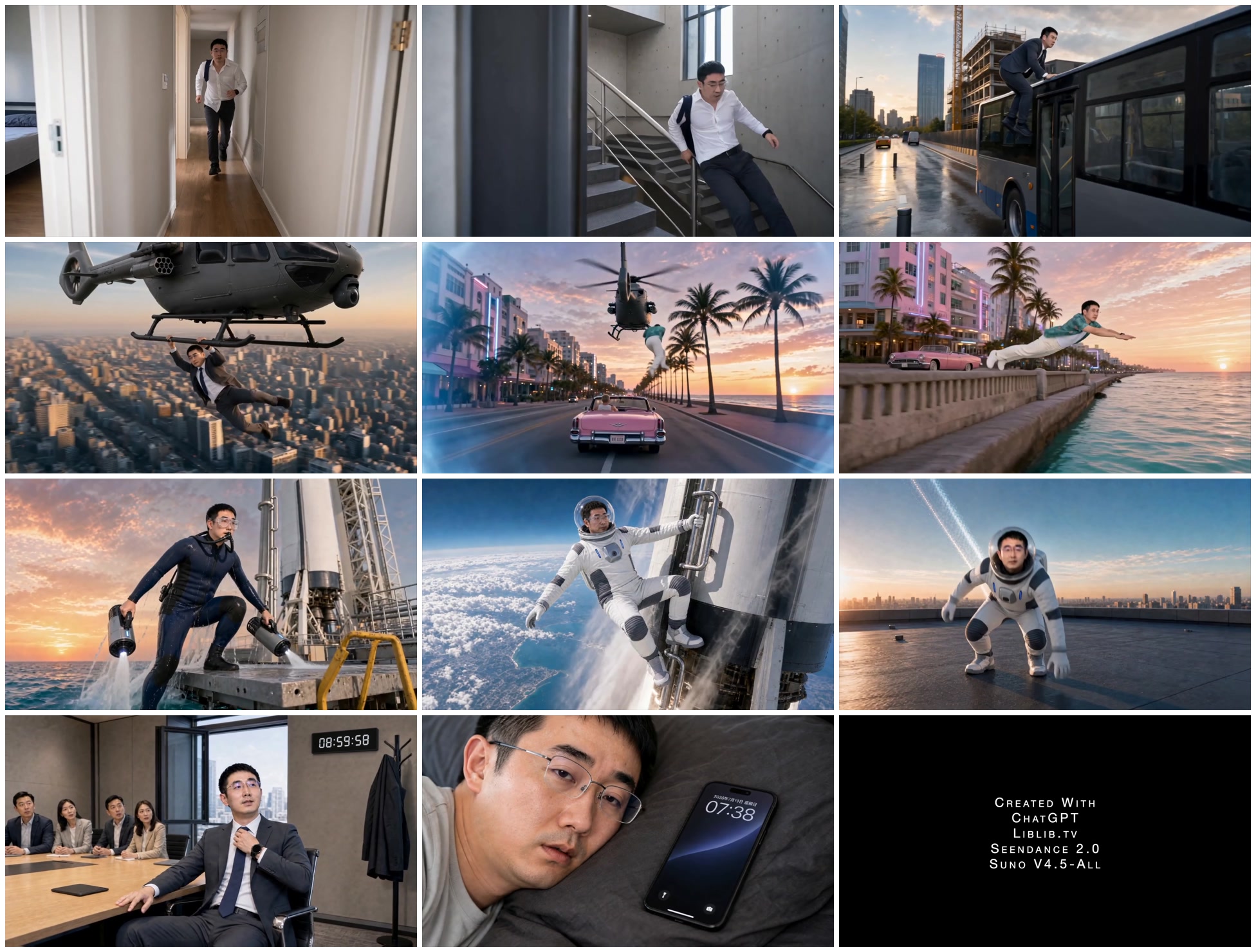
Although the setting rushes from reality into the sky, the character maintains one continuous line of forward motion. To me, that is what makes “a single take” work: the camera does not literally shoot everything in one go; the audience simply continues to believe that the action never stopped.
2. Turn the Script into a Production Line First
At first, I was also prone to the impulse to open a video model and try a shot as soon as I had an idea. But if the character, clothing, setting, and action have not been decided, the video model has to design the character and setting, understand the action, and complete the camera movement within a few seconds. If even one element drifts, the whole shot has to be redone.
So the workflow I eventually adopted was not “script → video,” but:
Story script → shot breakdown → character master → clothing and prop designs → empty establishing shots → boundary keyframes → video prompts → segmented generation → review and rework → FCP editing → music and sound.
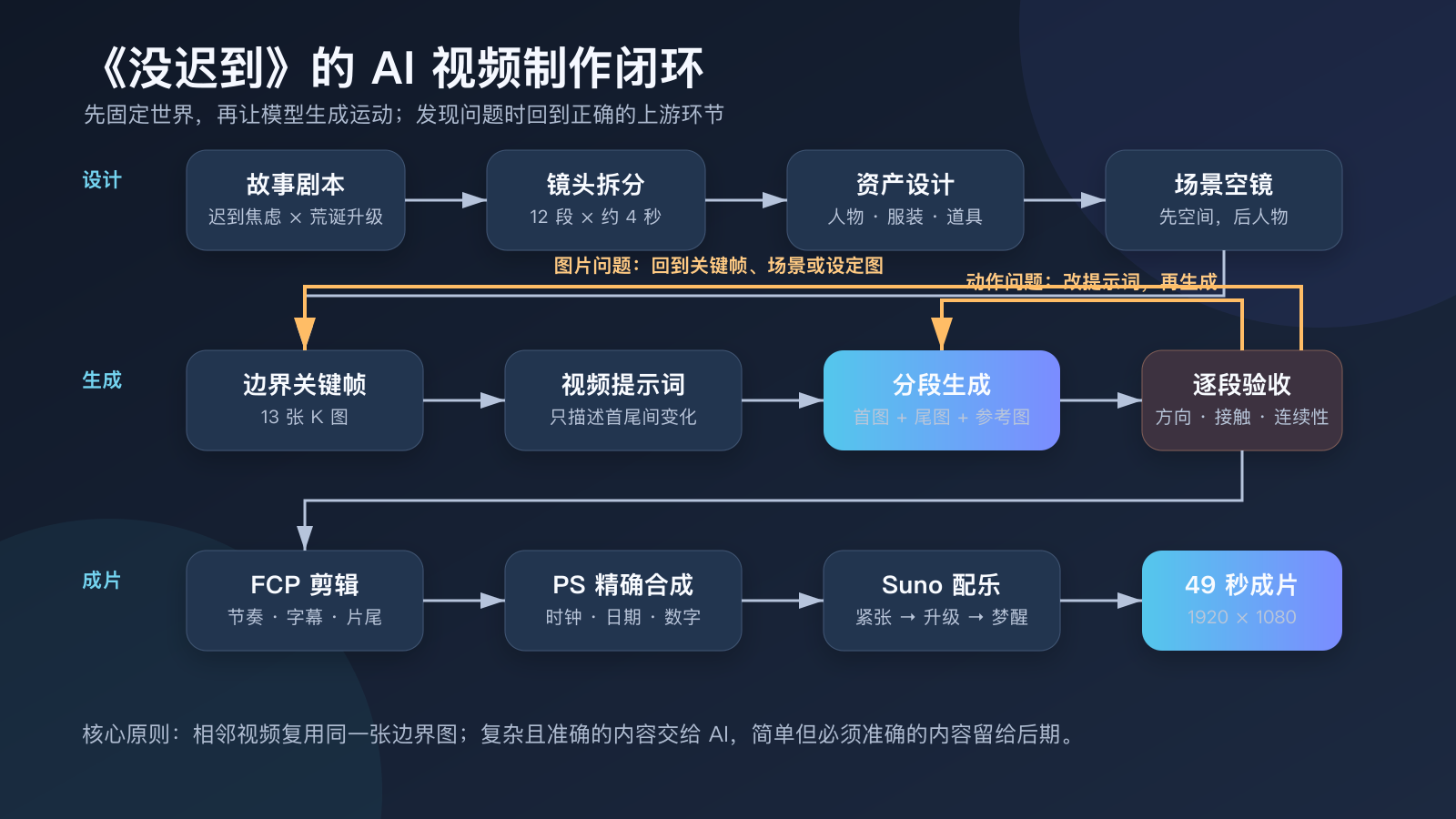
The most important layer in the middle is the “boundary keyframe.” The finished film used 13 boundary images: K00 through K11, with an additional K07.5 inserted between them. Each adjacent pair corresponds to about 4 seconds of video. The last frame of one segment must become the first frame of the next exactly as it is, rather than being regenerated as an image that merely looks similar.
This may look mechanical, but it solves one of the most common problems in AI video: a sudden change of face, distorted clothing, or a jump in the setting at the seam. It is like pinning two fixed anchors to each video segment and asking the video model only to decide “how to move from here to there.”
The project was initially planned as 11 segments lasting 44 seconds. During generation, I found that fitting “grabbing the rocket and rising, changing into a spacesuit, and then returning to the rooftop from high altitude” into 4 seconds made the action far too dense. So I added K07.5 and split this section into V08A and V08B. The final version had 12 video segments, with about 48 seconds of source material in total; after editing and adding the end credits, the finished film was about 49 seconds long.
This was a typical adjustment for the project: instead of stuffing more adjectives into the prompt, I admitted that one shot could not hold everything and redrew the production boundary.
3. The Images Are Not Illustrations; They Are the Art Direction for the Entire Film
The final project directory kept 28 official image assets, mainly divided into a character identity master, clothing and vehicle design sheets, empty establishing shots without the character, and boundary keyframes with the character and action added.
Lock Down “Who I Am” First
I first uploaded front and back photos of myself and asked ChatGPT to generate a character identity master called ID-MASTER. This image was not meant to look beautiful; it was meant to fix the face shape, hairstyle, shoulder width, body proportions, and rear silhouette.
Excerpt from the character prompt: Use the front photo to lock the facial features, skin tone, and front hairstyle; use the back photo only for the hairstyle at the back of the head, shoulder width, and body proportions. Preserve the real face shape, distance between the eyebrows and eyes, bridge of the nose, lips, jawline, hairline, and sense of age. Do not slim the face, enlarge the eyes, smooth the skin, or make the person younger, and do not generate a new actor who merely “looks similar.”
AI tends to make people more standardized and polished by default. The short film did not need a beautified actor; it needed the same person to keep appearing across all twelve shots.
Then Lock Down the Clothing and Props
Based on the story, I created seven clothing states in total: pajamas, a commuting outfit that had only been half put on, a complete suit, a Miami-style Hawaiian outfit, a diving suit, a lightweight spacesuit, and a black tactical suit worn over the business suit. I created a three-view sheet for each outfit first, then used it to generate the keyframes.
Three-view sheets turn a vague description such as “dark suit” into a defined structure: how wide the lapels are, what color the tie is, which shoes are being worn, and whether there is a vent in the back. Otherwise, when the same outfit reaches the side or rear view, the model can easily redesign it.
The helicopter appears in several consecutive shots. If I wrote only “an armed helicopter” in every image, the model would probably generate a different model each time. So I created a separate HELICOPTER-MASTER to fix the four-blade main rotor, ducted tail rotor, body color, sensors, hardpoints, and twin skids.
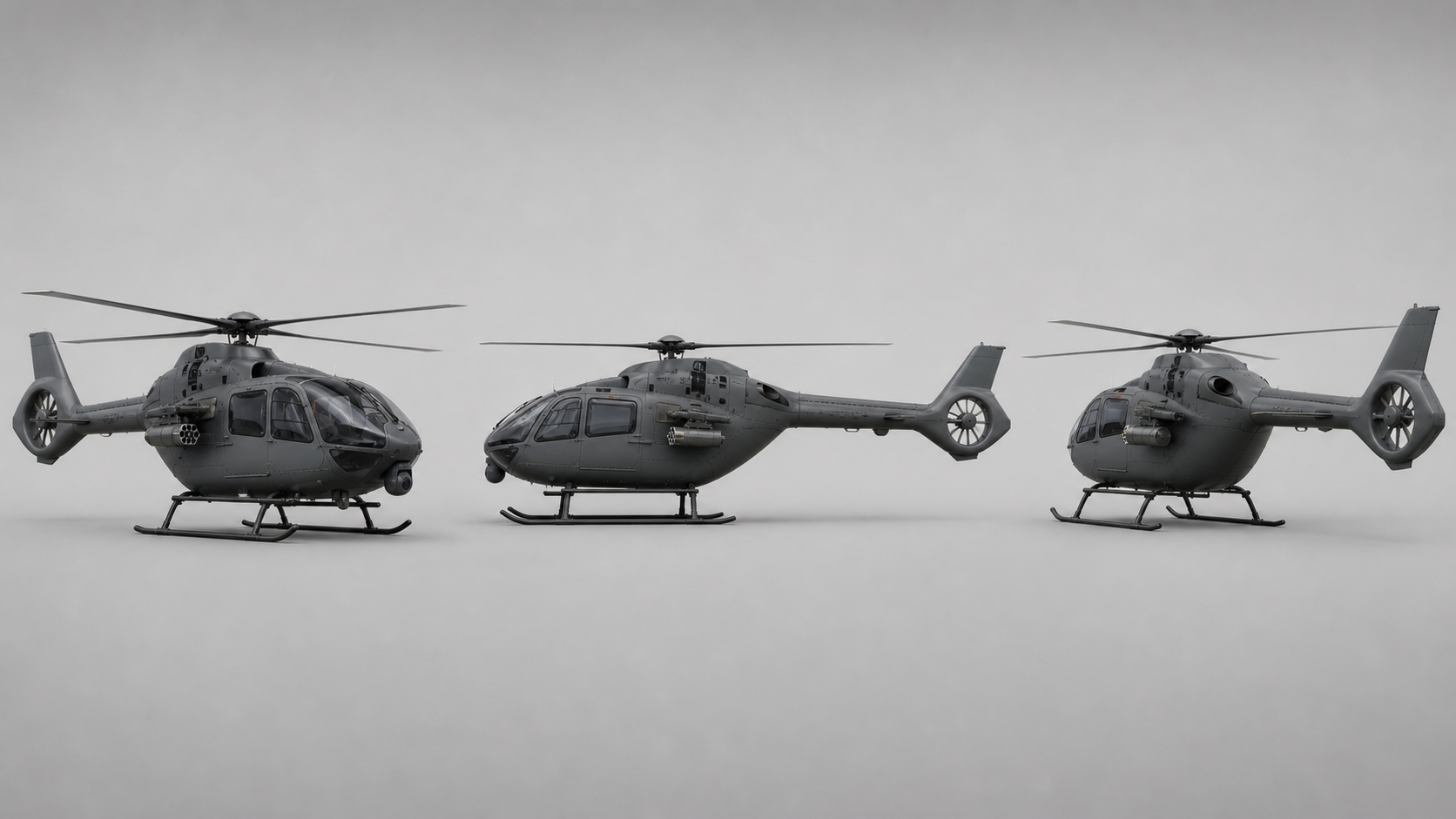
The character has to grab the helicopter’s skid, so the skid must be fully visible and unobstructed, with enough room to hold it. A prop design cannot consider only “what it looks like”; it also has to consider “how the actor will use it.”
Generate the Empty Shot First, Then Put the Person In
For complex settings, I did not ask the model to generate “character + environment + action” all at once. I made an empty establishing shot without the character first, confirmed the lighting, camera position, spatial route, and landing point, and then placed the character into the setting.

This makes it possible to identify which layer is wrong when a problem appears: redo the empty shot if the setting direction is wrong; redo the keyframe if the character’s action is wrong; return to the clothing reference if the outfit drifts; strengthen the master-image constraints if the prop deforms. If everything is generated temporarily in one image, reworking it means tearing down the whole image and starting over.
4. Three Shots That Show How Images and Video Connect
Case One: Grabbing the Helicopter from the Bus Roof
The first frame K03 of this section keeps the character running steadily on the bus roof, with the helicopter skid clearly visible in the front right; the last frame K04 fixes the state in which both hands hold the same skid and the body hangs in midair.
Excerpt from the K04 image prompt: The camera is below and to the front left of the helicopter, moving at the same speed as it. The protagonist wears a complete suit. His hands are separated by approximately shoulder width and clearly grip the same metal skid on the side closest to the camera, with the fingers fully wrapped around the round tube; his arms are slightly bent under the load, and his body hangs below the helicopter while leaning backward. The skid, both hands, and the body must remain unobstructed.
Excerpt from the V04 video prompt: The protagonist sprints along the bus roof and jumps at the front edge. His right hand grabs the near-side skid first, and his left hand immediately secures the same skid at shoulder width. The helicopter sinks once in a controlled way from the added weight, then rises steadily; the camera moves smoothly from the side of the bus up to below and in front of the helicopter’s left side, without circling or reversing direction.

This case confirmed something for me: the first and last images define the world; the video prompt defines the change. Anything already established in the images does not need to be redesigned in the video prompt.
Case Two: The Most Easily Overlooked Element Is Not the Face, but the Direction
The shot that moves from the helicopter into the Miami-style world was the most typical example of rework in the entire project. The initial image looked spectacular, but on closer inspection the vehicle was facing the wrong way, the steering wheel looked as if it had been placed at the rear, and the motion axes of the character, car, and helicopter were not aligned.
In a single image, this kind of error may be only a “minor flaw,” but video magnifies it. The car has to drive forward, the character has to land in the front passenger seat, and the helicopter has to fly in the same direction. If the spatial relationship in the first image is ambiguous, the video model can only guess.
So I returned to the image stage and changed the composition to a clear “rear tracking shot”: the camera is behind the convertible; the car drives away from the camera toward the far end of the road; the blond driver sits on the left, with the steering wheel directly in front; the protagonist faces away from the camera in the direction the vehicle is traveling; and the helicopter is directly above the character and car, flying in the same direction.
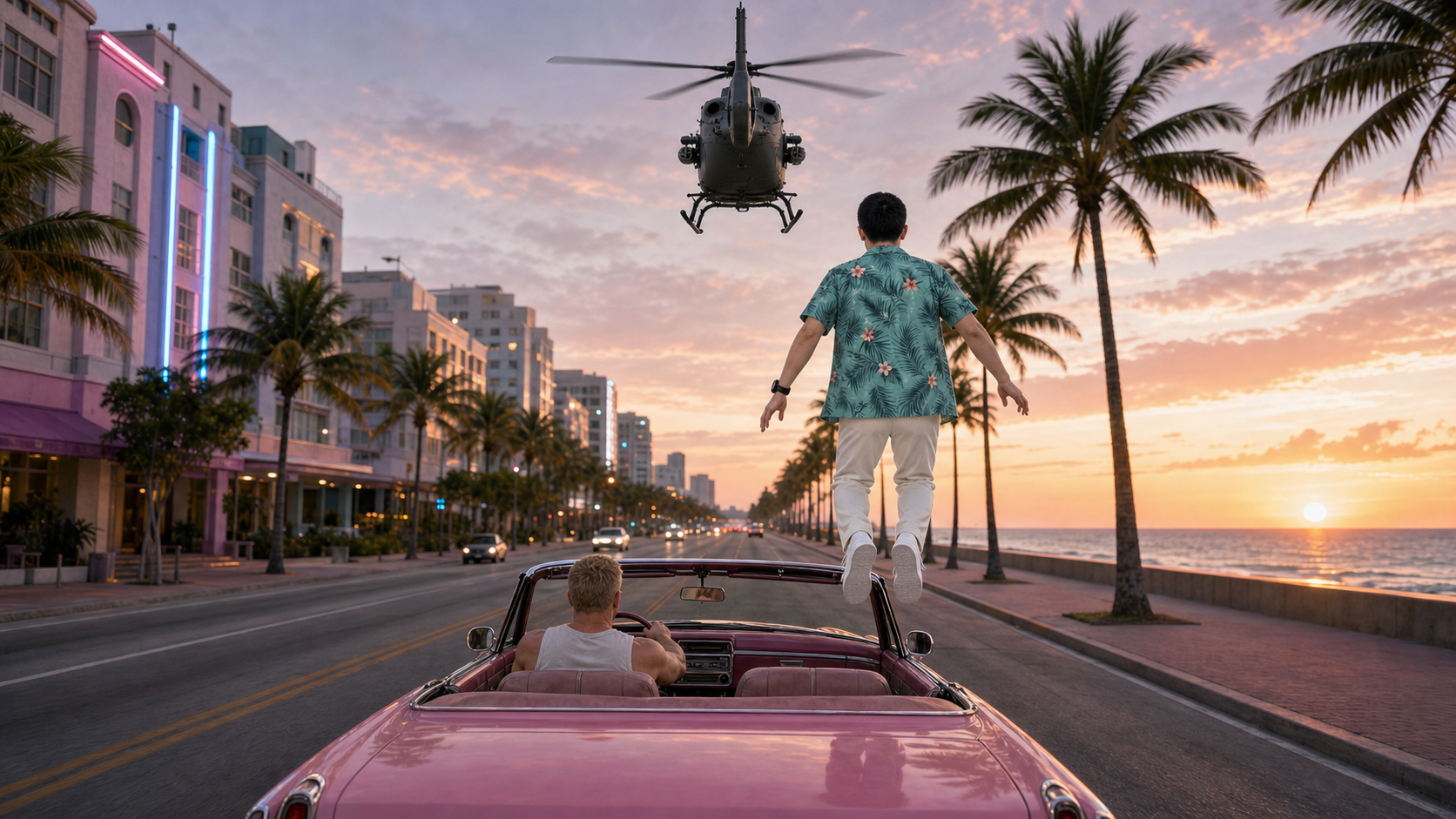
The video prompt also stopped saying only “fall into the car” and broke the process into continuous actions: pass through the cloud gate, complete the costume change, let go after using the swing, adjust to both legs pointing downward, and land in the passenger seat on the right.

This section taught me that direction is a first-class citizen in AI generation. Which way the character faces, which way the front of the car points, where the camera is shooting from, and where an object leaves the frame are often more important than “cinematic” or “blockbuster” style.
Case Three: A Prompt Cannot Save an Overloaded Shot
In the original plan, V08 had to complete all of the following in 4 seconds: run toward the rocket, grab it, rise into the sky, change from a diving suit into a spacesuit, leave the rocket, descend through the clouds, and land on the rooftop. The sequence was coherent as a story, but clearly overloaded as a generation task.
In the end, I added K07.5 and split it into two segments: V08A handled the ascent and costume change, while V08B handled leaving the rocket, descending, and landing.
Excerpt from the V08A prompt: The protagonist releases both underwater propulsion devices and rushes toward the same white rocket. He grips the external maintenance pipe and fixed handhold on the outside of the rocket, remaining outside it throughout. The rocket ignites and rises vertically; high-altitude airflow and thermal insulation unfold continuously along his body, transforming the diving suit into a lightweight spacesuit. After reaching high altitude, one hand still holds the handhold as his body begins to lean outward, preparing to jump.

The important point here is not that I generated “one more segment,” but that I treated segmentation as part of directing. If the model keeps failing, first check whether one shot is carrying too many tasks. Often, reducing the action is more effective than adding more prompt text.
5. Use a Scheduled Task to Loop Through Generation, but Do Not Let AI Approve It Automatically
There were quite a few images, and staying in front of the computer to generate them manually would quickly become tiring; it would also be easy to forget the standards established earlier. So during the image stage I used ChatGPT’s scheduled tasks: it processed roughly one image every half hour, cycling through the asset sequence I had arranged in advance.
It was not mindless batch image generation. It read the current asset and reference images, generated a candidate, checked identity and composition against an acceptance checklist, wrote an accepted status only after it passed, and then moved to the next image; if it failed, it revised the prompt and continued reworking the current image.
I ultimately locked seven clothing sets and one continuous chain of keyframes. The value of this loop was not only saving waiting time. More importantly, it turned “I think this one looks pretty good” into explicit standards: Is it still the same person? Has clothing from an earlier stage crept in? Do the hands and feet have real contact points? Is there enough space for the next action? Are the vehicle and character facing the same direction? Can this image serve as both the last frame of the previous segment and the first frame of the next?
AI can loop, but a person still has to define the aesthetic standards and acceptance rules.
6. Enter LibTV and Start “Opening Blind Boxes”
Once the images were locked, I asked ChatGPT to generate prompts for each of the 12 video segments, then put the first image, last image, reference images, and prompts into LibTV to generate the videos with Seedance 2.0.
I chose 720P. The final segmented assets in the project were all 1280 × 720, with each segment lasting about 4 seconds. For this project, 720P was better suited to frequent trial and error: first get the action, character consistency, and shot transitions working, then output the 1080P finished film in post-production.
Just under half of the segments needed reworking to some degree. Sometimes the action was incomplete. Sometimes the problem was not the video prompt, but an error hidden in the first and last images: the character was facing the wrong way, the front and rear of the vehicle were ambiguous, the steering wheel was in the wrong place, a hand was not really holding the prop, the costume change produced a third state, or too many actions had been crammed into 4 seconds.
In that situation, the right approach was not to keep blindly drawing in LibTV, but to go back upstream:
Video fails → decide whether it is an action problem or an image problem → revise the prompt or redo the boundary image → generate again → review again.
AI video production is not a straight line from left to right. It is more like a loop that repeatedly backs up and converges. The final version used 12 video segments. At an estimate of about 100 credits per generation, the basic cost would have been about 1,200 credits if every segment had succeeded on the first try; including failures and reworks, the total was about 2,000 credits, or roughly 20 generations, equivalent to a little over one hundred yuan. This is an approximate estimate based on the consumption at the time, not an exact bill.
The generation cost was not outrageous. The truly expensive part was the time spent selecting, judging, and reworking.
7. Why I Still Returned to FCP and Photoshop
After the video segments were generated, I did not use LibTV’s online editing tools. I returned to the familiar Final Cut Pro. At the finished-film stage, I needed more precise control over subtitles, pacing, sound, transitions, and end credits. AI is good at solving “from nothing to something”; traditional tools are better at solving “from something to precise.”
The most troublesome detail in post-production was the clock in the frame. The suspense of the story depends on 08:59:59, but AI has difficulty generating an electronic clock with accurate digits, a stable position, and a display that actually progresses. The phone lock screen had the same issue: the numbers could deform, the Chinese date could turn into gibberish, and it could change from frame to frame.
For content that had to be one hundred percent accurate, I stopped handing it to the generative model. I made the visual elements in Photoshop, then composited them and created the time changes in FCP.
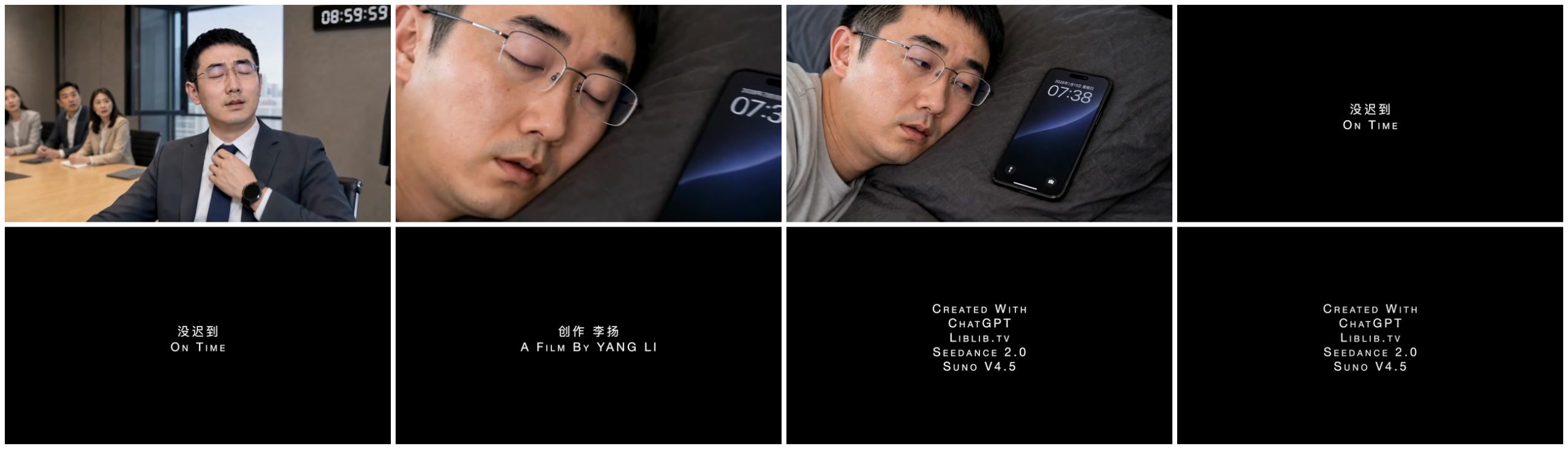
This gave me a practical rule of thumb: AI handles complex parts that can tolerate a small amount of randomness; traditional tools handle simple parts that must be completely accurate. Let AI create the character leaping over a city and rising while holding onto a rocket; the digits 08:59:59 are better done by hand.
Finally, I used Suno to generate background music for the short film. The prompt revolved around “a tense chase → an absurd escalation → a sudden stop → waking from the dream”: starting with the ticking of a clock, moving into action-comedy music combining electronic and orchestral elements; as the bus, helicopter, ocean, and rocket kept escalating, maintaining the same melodic motif while making it increasingly heroic and increasingly absurd; then stopping suddenly in the meeting room and returning to a distant ticking sound. The final credits list ChatGPT, LibTV, Seedance 2.0, and Suno V4.5.
8. Three New Things I Realized About AI Video After Finishing
1. Consistency does not come from a magic prompt; it comes from asset management. The same person, outfit, and helicopter can remain consistent across shots because I created masters, three-view sheets, empty shots, and boundary images first, and had every shot refer to the same asset set.
2. The core of a prompt is not its literary style, but its executability. What really reduces rework is spelling out who is doing what, what the hands and feet touch, where the camera is, which direction the character and vehicle face, what cannot change, and exactly where the final frame must land.
3. AI has not eliminated traditional production; it has redistributed the work. Images that once required live filming, costumes, sets, and visual effects can now be made by one person. But directorial thinking, shot breakdowns, asset naming, quality checks, editing, and sound have not disappeared; because AI brings more randomness, those jobs have become even more important.
In Closing
On Time is not a perfect film. Look closely and you can still find traces of AI generation, and some actions are constrained by the four-second duration and cannot obey physical laws as completely as a real shoot would.
But for me, it was a complete experiment: the first time I took a small thought from everyday life, expanded it from one sentence into a story, broke that story into assets, shots, and prompts, went through multiple failures and reworks, and ultimately made a short film that could genuinely be shared.
In the past, it was nearly impossible for one person to film helicopters, the deep sea, rockets, and high-altitude falls. Now the question has gradually shifted from “Do I have that kind of budget?” to “Can I think it through, break it down clearly, and patiently carry it through to the end?”
AI has given ordinary creators an increasingly large virtual studio. But once the cameras roll, you still have to be the one sitting in the director’s chair.
Project data: Finished film On Time, about 49 seconds; 28 official image assets; 13 boundary keyframes; 12 720P video assets; post-production output at 1920 × 1080; tools used: ChatGPT, LibTV, Seedance 2.0, Final Cut Pro, Photoshop, and Suno V4.5; video generation consumed about 2,000 credits, equivalent to a little over one hundred yuan (estimated).