Preface: From my first CTF (Capture The Flag, a type of cybersecurity competition) several years ago to the recent HECC (the UK University Cyber Security Challenge), I have encountered many QR Code challenges in the miscellaneous category. Solving these challenges requires a thorough understanding of how QR Codes are generated, as well as image-editing software for processing them and ultimately obtaining the answer. As a photography enthusiast, I am very comfortable with image processing, and I can often get the answer to a QR Code challenge quite easily with small Photoshop tricks that challenge authors do not expect. Since QR Code is the most common type of two-dimensional code, this article discusses QR Code specifically. The background knowledge and the challenge collection are both fairly long, so I have divided the article into two parts. Part 1 covers QR Code fundamentals, and Part 2 covers QR Code challenges and solving tips.
1. What Is QR Code
To solve QR Code challenges in CTFs, you first need a basic understanding of QR Code types, structure, and generation algorithm.
QR Code (Quick Response Code) is an encoding method for two-dimensional codes. Blocks of contrasting color represent the binary data 0 and 1, and a two-dimensional matrix of blocks represents numbers, English, Chinese, Japanese, and other content [1]. A computer or smart device can decode it with an image-recognition device.
In 1994, Masahiro Hara of DENSO WAVE, a parts supplier for Toyota in Japan, designed and invented QR Code [2]. DENSO WAVE holds the QR Code patent, but stated that it would not enforce its patent rights so that more people could use QR Code [3]. QR Code became the ISO/IEC 18004 standard in 2000 and was optimized in 2006 and 2015 [4]. Because QR Code can store more information than barcodes and has strong resistance to interference, it is widely used for operations such as scanning codes with mobile phones.
2. Types of QR Code
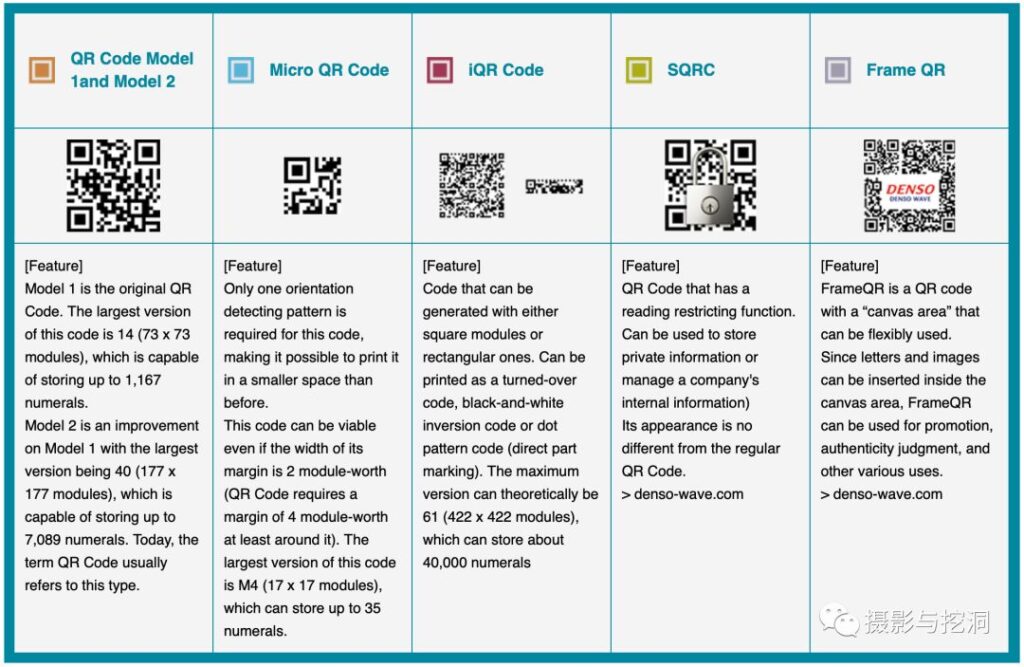
There are currently five types of QR Code, each with different characteristics and uses [5]: QR Code Model 1/2, the most widely used in daily life (the QR Code mentioned in this article is Model 2); Micro QR Code, which has only one finder pattern and is suitable for small-area printing; iQR Code, which has greater information capacity; SQRC, which can store private information (its appearance is indistinguishable from Model 2); and Frame QR, which can flexibly incorporate images.
3. Overview of the QR Code Generation Process
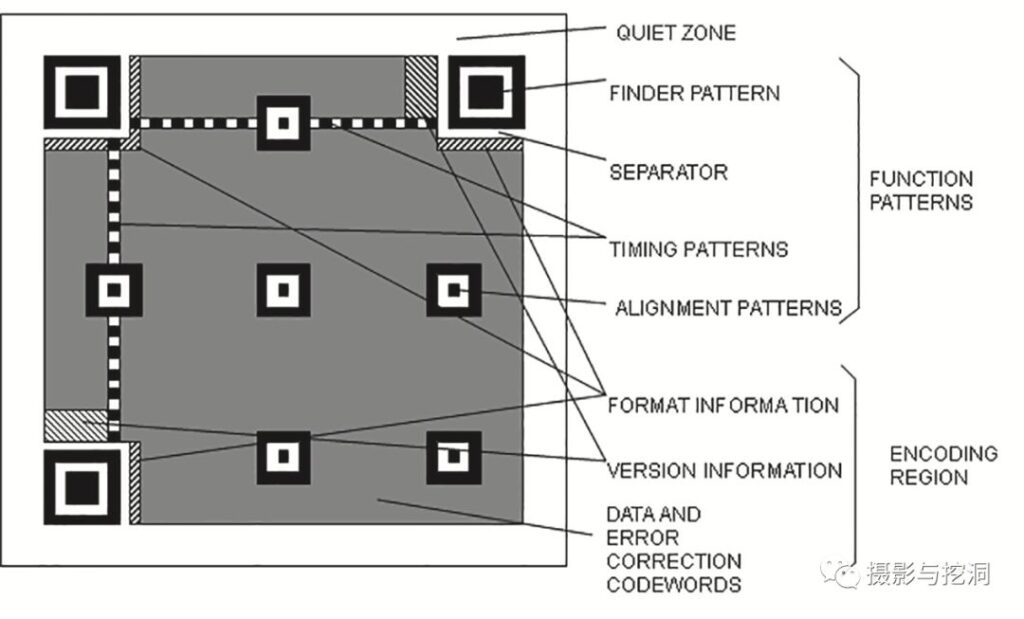
First, let us look at the structure of QR Code. Its basic building block is the module, the smallest square in the pattern [6]. A QR Code consists of functional patterns (finder patterns, alignment patterns, timing patterns, and separators) and an encoding region (format information, version information, data, and error-correction regions). A finder pattern is a fixed 7*7-module pattern: a solid 3*3-module square in the center surrounded by a hollow 7*7-module square. An alignment pattern is a 5*5-module pattern. Except for Version 1, which needs no alignment patterns, the number of alignment patterns in other versions is numbers = pow( (version / 7 -1) , 2 ) – 3. The timing pattern is fixed as an alternating black-and-white pattern. The encoding region is filled in the fixed order shown in the figure below [7].
QR Code generation can be divided into five broad steps: select an error-correction level and a version that can hold the corresponding amount of data; group and encode the data; calculate error-correction information; calculate and add a suitable mask; and calculate the version and format information. These steps produce a complete QR Code pattern [7].

3.1 Select the Error-Correction Level and a Version That Can Hold the Data
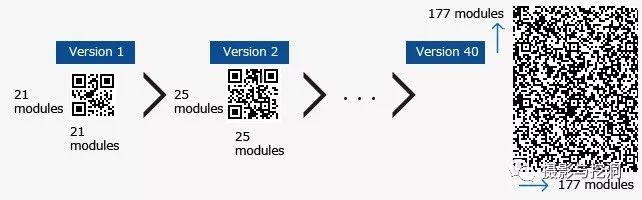
First, choose the QR Code error-correction level (Data Correction Level) and version (Version) based on the amount of information to store and the code’s intended use. QR Code has four error-correction levels, L, M, Q, and H, corresponding to recovery rates of approximately 7%, 15%, 25%, and 30%. For example, encoding the URL “http://li-yang.cn” as a QR Code gives 17 characters. If it is displayed on a screen, where obstruction or damage is unlikely, level L is sufficient. Consulting the version/error-correction-level table [8] shows that Version 1 can store this URL. The QR Code version determines the number of modules, while the version and error-correction level together determine the information capacity [8]. Version 1 has 21*21 modules. The module-count formula is: module = 17 + 4 * version.
3.2 Group and Fill the Data
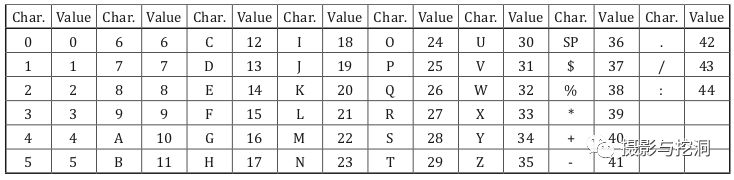
Group the data to be encoded in pairs, for example (ht)(tp)(:/)(/l)(i-)(ya)(ng)(.c)(n0). Encode the pairs using the alphanumeric encoding table below, then calculate their binary values with the formula [7] to obtain the data-region information. Encoding the version and format information likewise produces the version-information and format-information data.
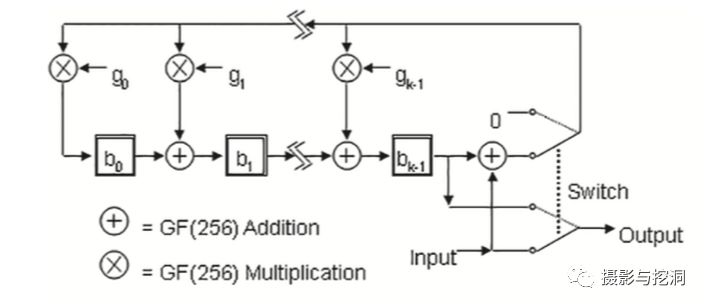
3.3 Calculate Error-Correction Information
Encode the data-region information obtained in the previous step using the error-correction formula. As described in the ISO/IEC 18004 standard, this calculation can be represented by a logic circuit diagram [7].
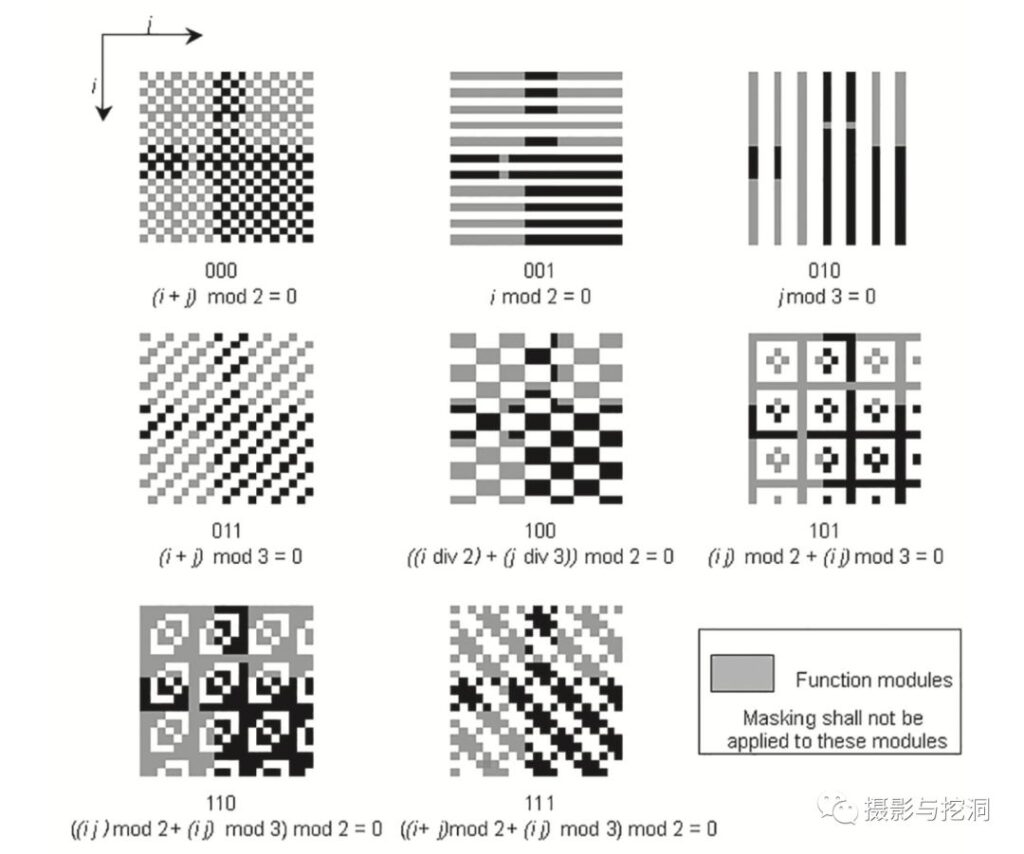
3.4 Calculate and Add a Suitable Mask
The calculations above produce the contents of the data and error-correction regions. To prevent large or continuous areas of black or white and to keep functional patterns from appearing in the data region, a mask must be applied to the data-region pattern. There are eight mask patterns. Calculations are used to determine which suits the data best, and the data is XORed with that mask to produce the final data pattern [7].
3.5 Write the Version and Format Information
Refer to the standard document to obtain the corresponding encodings for the QR Code’s version, mode, and mask information, and write them into their respective regions. No second encoding or mask operation is needed here [7].
The complete final pattern is obtained after these calculations.
References:
1. https://www.qrcode.com/
2. https://www.denso-wave.com/zh/technology/vol1.html
3. https://www.qrcode.com/en/history/
4. https://www.iso.org/standard/62021.html
5. https://www.qrcode.com/en/codes/
6. https://www.qrcode.com/en/howto/cell.html
6. https://www.qrcode.com/en/about/error_correction.html
7. ISO/IEC 18004-2015 Information technology — Automatic identification and data capture techniques — QR Code bar code symbology specification
8. https://www.qrcode.com/en/about/version.html