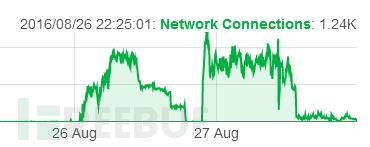
My WordPress blog runs on a VPS. Yesterday morning I suddenly received an alert that the site was down. What follows is what happened…
Analysis
Because my VPS exposed only HTTP to the outside world, I checked Apache’s access log immediately after rebooting the machine. I found tens of thousands of POST requests to xmlrpc.php, coming from two overseas IP addresses.
24019 191.96.249.53 - - [26/Aug/2016:08:21:57 +0800] "POST /xmlrpc.php HTTP/1.0" 200 579 "-" "Mozilla/4.0 (compatible: MSIE 7.0; Windows NT 6.0)"
24020 191.96.249.54 - - [26/Aug/2016:08:21:58 +0800] "POST /xmlrpc.php HTTP/1.0" 200 579 "-" "Mozilla/4.0 (compatible: MSIE 7.0; Windows NT 6.0)"
24021 191.96.249.54 - - [26/Aug/2016:08:21:59 +0800] "POST /xmlrpc.php HTTP/1.0" 200 579 "-" "Mozilla/4.0 (compatible: MSIE 7.0; Windows NT 6.0)"
24022 191.96.249.53 - - [26/Aug/2016:08:22:00 +0800] "POST /xmlrpc.php HTTP/1.0" 200 579 "-" "Mozilla/4.0 (compatible: MSIE 7.0; Windows NT 6.0)"
24023 191.96.249.54 - - [26/Aug/2016:08:22:00 +0800] "POST /xmlrpc.php HTTP/1.0" 200 579 "-" "Mozilla/4.0 (compatible: MSIE 7.0; Windows NT 6.0)"
24024 191.96.249.54 - - [26/Aug/2016:08:22:03 +0800] "POST /xmlrpc.php HTTP/1.0" 200 579 "-" "Mozilla/4.0 (compatible: MSIE 7.0; Windows NT 6.0)"
24025 191.96.249.53 - - [26/Aug/2016:08:22:04 +0800] "POST /xmlrpc.php HTTP/1.0" 200 579 "-" "Mozilla/4.0 (compatible: MSIE 7.0; Windows NT 6.0)"
24026 191.96.249.53 - - [26/Aug/2016:08:22:10 +0800] "POST /xmlrpc.php HTTP/1.0" 200 579 "-" "Mozilla/4.0 (compatible: MSIE 7.0; Windows NT 6.0)"
24027 191.96.249.53 - - [26/Aug/2016:08:22:15 +0800] "POST /xmlrpc.php HTTP/1.0" 200 579 "-" "Mozilla/4.0 (compatible: MSIE 7.0; Windows NT 6.0)"
……
My first thought was that my blog was under a DoS attack: access to xmlrpc.php generated heavy computation and exhausted the machine’s resources. The VPS hosting my blog is very underpowered, so downtime seemed understandable. Since my WordPress did not use xmlrpc.php, I deleted it and assumed the problem was solved.
That evening I checked the server status again and found hundreds of network connections still open. The same two IPs were still sending large numbers of requests to xmlrpc.php. I became curious about the request contents.
I used tcpdump on the VPS to capture traffic on port 80 and discovered that the attackers had been using my VPS as a zombie to attack other sites. The POST packet data is shown below:
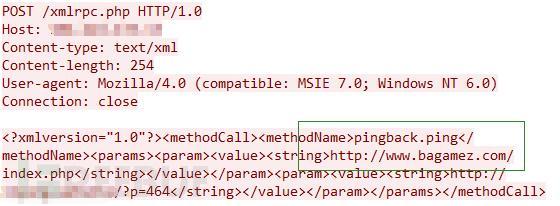
Stepping back from that curiosity, I suddenly understood: the attackers were using WordPress’s pingback function and its ping method to launch an ICMP FLOOD attack against http://www.bagamez.com/.
How can this be fixed?
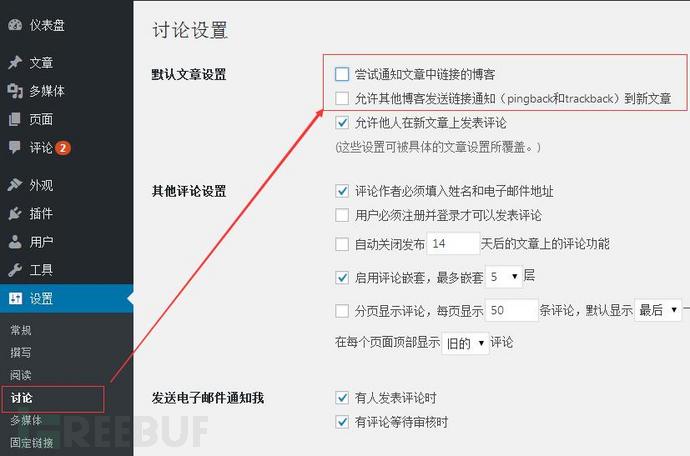
◆Disable “Notify any blogs linked to from the article” and “Allow other blogs to send link notifications (pingback and trackback) to new articles” in the WordPress admin.
◆If the WordPress site does not use xmlrpc.php, simply rename or delete it.
◆On Linux, use iptables to restrict access by the attacker’s IP.
iptables -I INPUT -s IP -j DROPAfter that, my WordPress site was no longer an unwitting participant in a DDoS attack.